 INDEPENDENT DV PHOTO TOOLCHECK THE CURRENT DV PROGRAM INSTRUCTIONS
DV Lottery Photo Checker: Free File Check
Check an existing Diversity Visa (Green Card Lottery) photo for JPEG format, exact 600×600 pixel dimensions and the 240 kB file limit. Your photo stays on your device during the free file check. Need a prepared file? Continue to the studio and review its assessment and price before checkout.
Free file check · No account needed
Check your existing DV photo file
See its actual dimensions, file size and JPEG format before you submit. This check runs in your browser: your selected photo is not uploaded or edited.
Also review the photo itself
File checks do not assess head position, lighting, background, color profile, glasses, recency or digital alteration. Passing these checks is not a government acceptance decision.
- Use a photo taken within the last six months, showing your current appearance.
- Face the camera with both eyes open, a neutral expression and no eyeglasses.
- Use a plain white or off-white background and even lighting without shadows.
- Check head height and eye position against the official composition instructions; do not digitally change your appearance.
This checks the online entry file, not the printed interview photos. The size check uses 1 kB = 1,000 bytes.
State Department DV photo requirements · Current program instructions
Composition guide
DV photo examples: framing, shadows and head position
AI-generated photo illustrations show common composition issues. They are teaching examples, not real applicants, submission-ready photos, government approvals or results from your uploaded file.
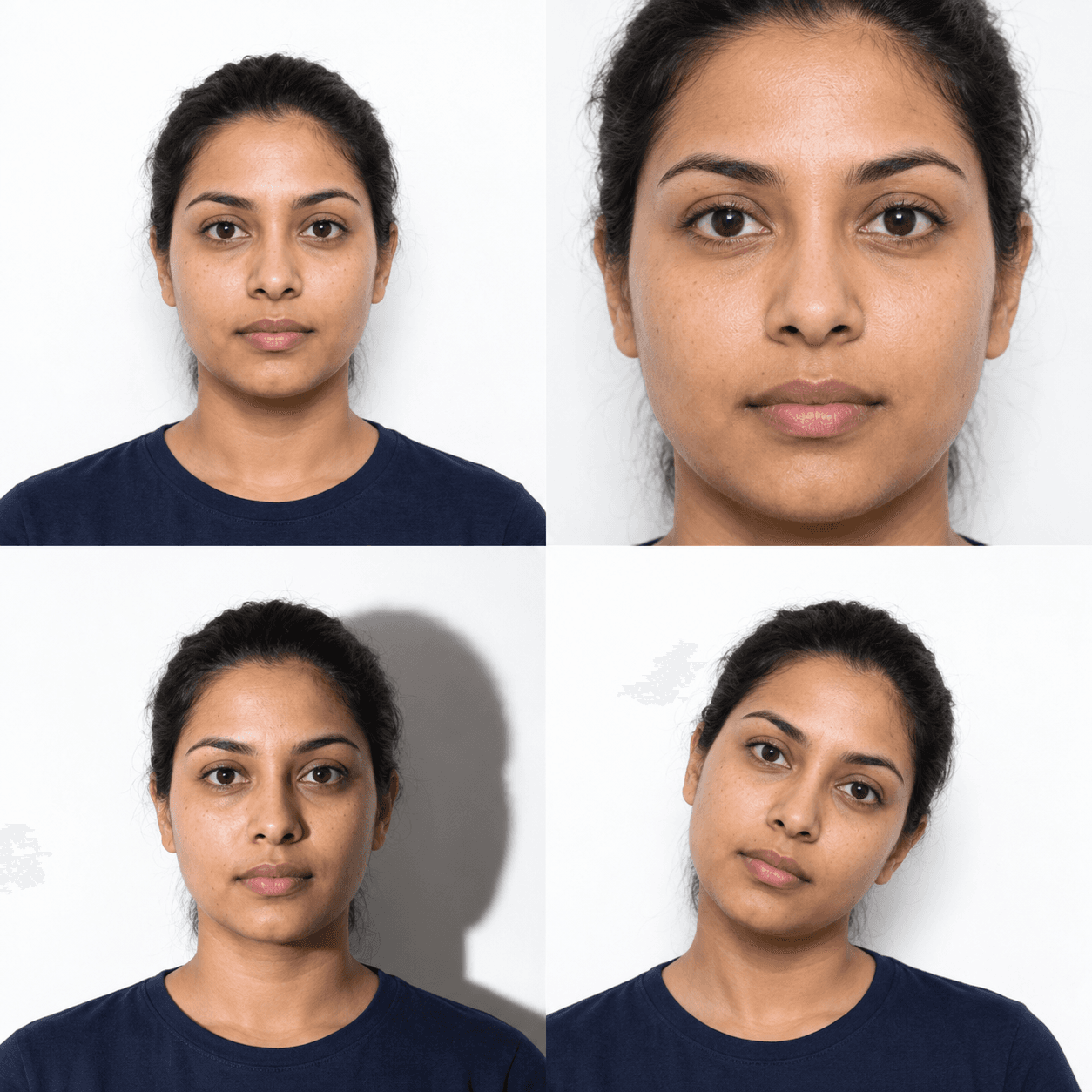
Aim for this composition
Centered, with room around the head
Face the camera directly. Keep the whole head visible, with space above the hair and a plain, evenly lit background.
Retake or adjust the crop
Crop too tight
Cut-off hair or an oversized head needs a wider crop from the original. Do not stretch the face or invent missing detail.
Improve the lighting
Shadow behind the head
Move away from the wall and use even light. Retake the original rather than assuming a smaller JPEG fixes a lighting problem.
Face the camera squarely
Head tilted to one side
Keep your head upright and eyes level. Ask someone else to take the photo if a selfie angle makes this difficult.
Measure from the top of the hair to the chin: the published composition range is 50–69% of image height, with the eyes 56–69% up from the bottom. The free file checker does not measure these features.
Compare with the State Department composition template. Check the current DV instructions for the online-entry file dimensions.
DV-2027: a federal court ordered registration to open by November 1, 2026, for 30 days. Official dates were not yet published at our October 17, 2026 check. See the court-ordered dates and photo rules.
Check your DV photo against the official requirements
A photo that does not meet the current DV entry instructions may make an entry ineligible. This tool checks measurable details such as size and framing, but only the US Department of State decides whether an entry is accepted.
What to do if your DV photo file fails
- PNG or HEIC instead of JPEG?
- Export a genuine JPEG copy. Renaming .png to .jpg does not convert the image. Check the exported copy again.
- Square, but not 600×600 pixels?
- A 1200×1200 image is square but fails the exact DV entry dimensions. Crop and resize a sharp original; stretching a small image cannot restore facial detail.
- Larger than 240 kB?
- Export the correctly sized JPEG with suitable compression. Keep the face clear: a smaller file with blur or compression artifacts still needs a better original.
- Every file check passes?
- Review the actual photo for head position, lighting, background, recency and alteration. You do not need to buy a replacement just because you used a checker.
This is an independent photo tool, not a lottery entry service or selection-results checker.
Online entry and interview photos
For the DV entry, the State Department specifies a square 600×600 pixel JPEG of no more than 240 KB. Selected applicants need two identical printed 2×2 inch photos for the interview. Check which stage you are preparing for.
Use a recent photo. Do not digitally alter your appearance; retake a picture with poor lighting or shadows. Review the State Department photo requirements and the current DV instructions.
DV Photo Requirements: File Size & Framing
How to Prepare Your DV Lottery Photo Online
Take a recent portrait against a white or off-white background with even lighting and no shadows.
Review dimensions and framing against the official instructions. Retake photos with shadows rather than digitally changing your appearance.
Download an optimized 600×600 pixel JPEG under 240 KB, formatted specifically for direct upload to the official State Dept DV lottery portal.
Frequently Asked Questions for DV Lottery Photos
Q:Can I submit a photo with glasses?
Remove glasses before taking your photo. Consult the official instructions for any documented medical exception; do not rely on an automated check to determine eligibility.
Q:Can I use last year's photo if my appearance hasn't changed?
Use a photo taken within the last six months that reflects your current appearance. Do not reuse a photo from a previous DV entry; review the current program instructions before submitting.
Q:What should I wear for the DV Lottery photo?
Wear normal, everyday street clothing with colors that contrast with the white background (e.g., navy, black, red, green). Avoid white clothing (which blends into the background) and uniforms. Religious headwear is permitted if the full facial oval is visible.
Need a new DV photo?
Start with a clear, recent portrait. Review the studio assessment and download price before paying, then check your final file against the current entry instructions.
Prepare my DV photo